 Laundry Shop POSby No Monthly Tools Download free
Stop giving away laundry you never charged for.
A counter system made for laundry shops. It tracks every bag from drop-off to pickup, and catches unpaid balances and unbilled work before the laundry leaves. It runs on your own Windows computer, works without internet, and you pay once.
- No card
- No account
- Nothing locked for 14 days
Then one payment of ₱1,999.00. Nothing to renew.
A notebook can't tell you what you forgot to charge.
- 01You know where each bag is because you remember it.
- 02You add up notebook pages to see what the day earned.
- 03Laundry went home unpaid. You only noticed later.
- 04A dryer load ran that nobody billed.
- 05Cloud POS wants ₱300–₱500 a month. Forever. And you never own it.
Laundry Shop POS was built for this exact counter. It is not a store POS bent to fit a laundry shop.
A spreadsheet can't say no. This can.
Every service knows which steps it covers.
A customer pays for Wash Only. Later, someone drags that ticket into Drying.
The system stops. It works out what drying that weight costs. Then it offers to add it to the same ticket.
That's money you were about to give away — caught before it happens.
This ticket is Wash Only.
Add drying for 7 kg to this ticket before moving it?
Illustration. Watch the real prompt in the video.
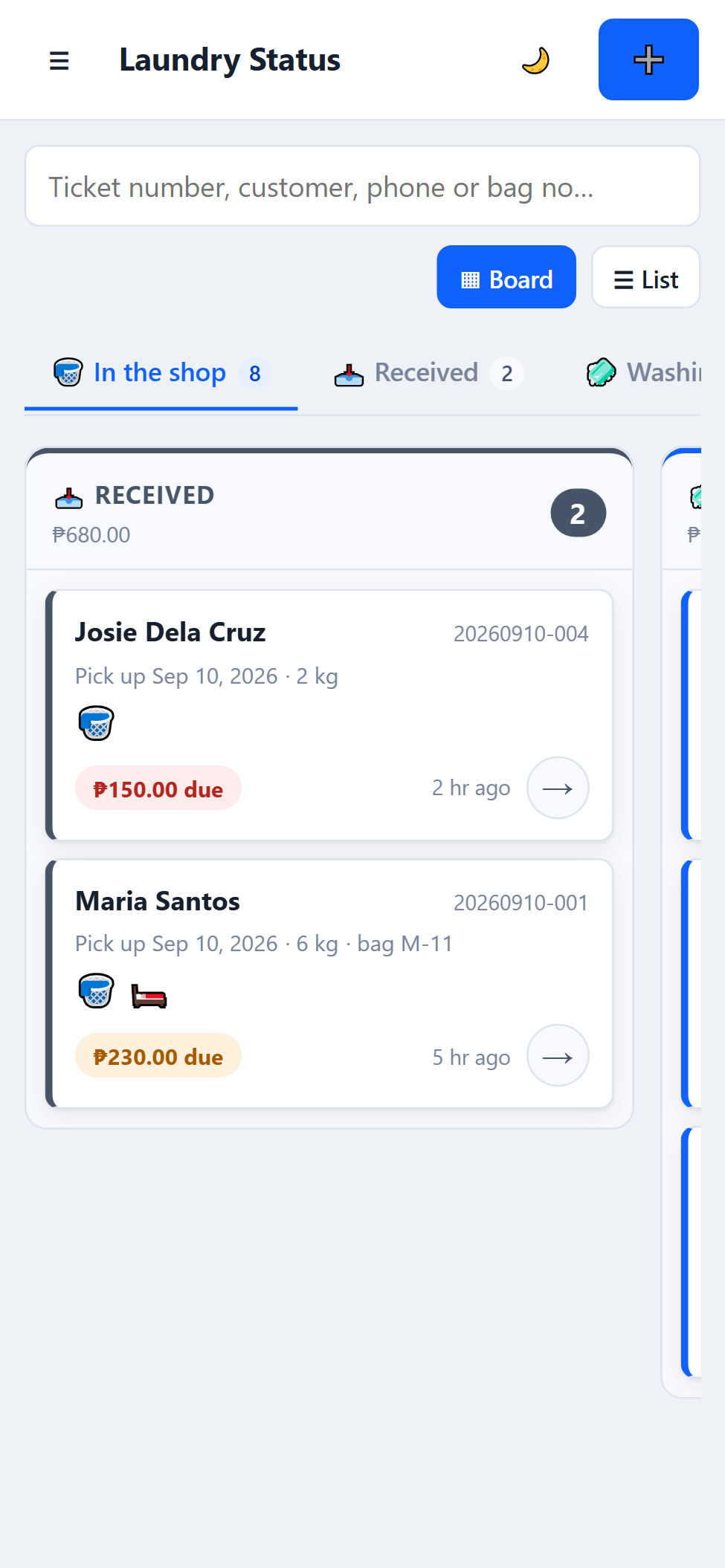
See every bag, every step, at a glance.
Every order is a card. Move it along as the work gets done.
- Received
- Washing
- Drying
- Folding
- Ready for Pickup
- Picked Up
Money in each columnEach column shows how many orders, and how much money, is sitting in it.
Late orders stand outAnything past its pickup date is flagged late.
Find any bag fastSearch by ticket number, name, phone or bag number. Prefer rows? There's a list view too.
Try it yourself, right here.
Click through the real app. No download needed.
On a phone? Open the demo full screen. It's easiest on a computer.
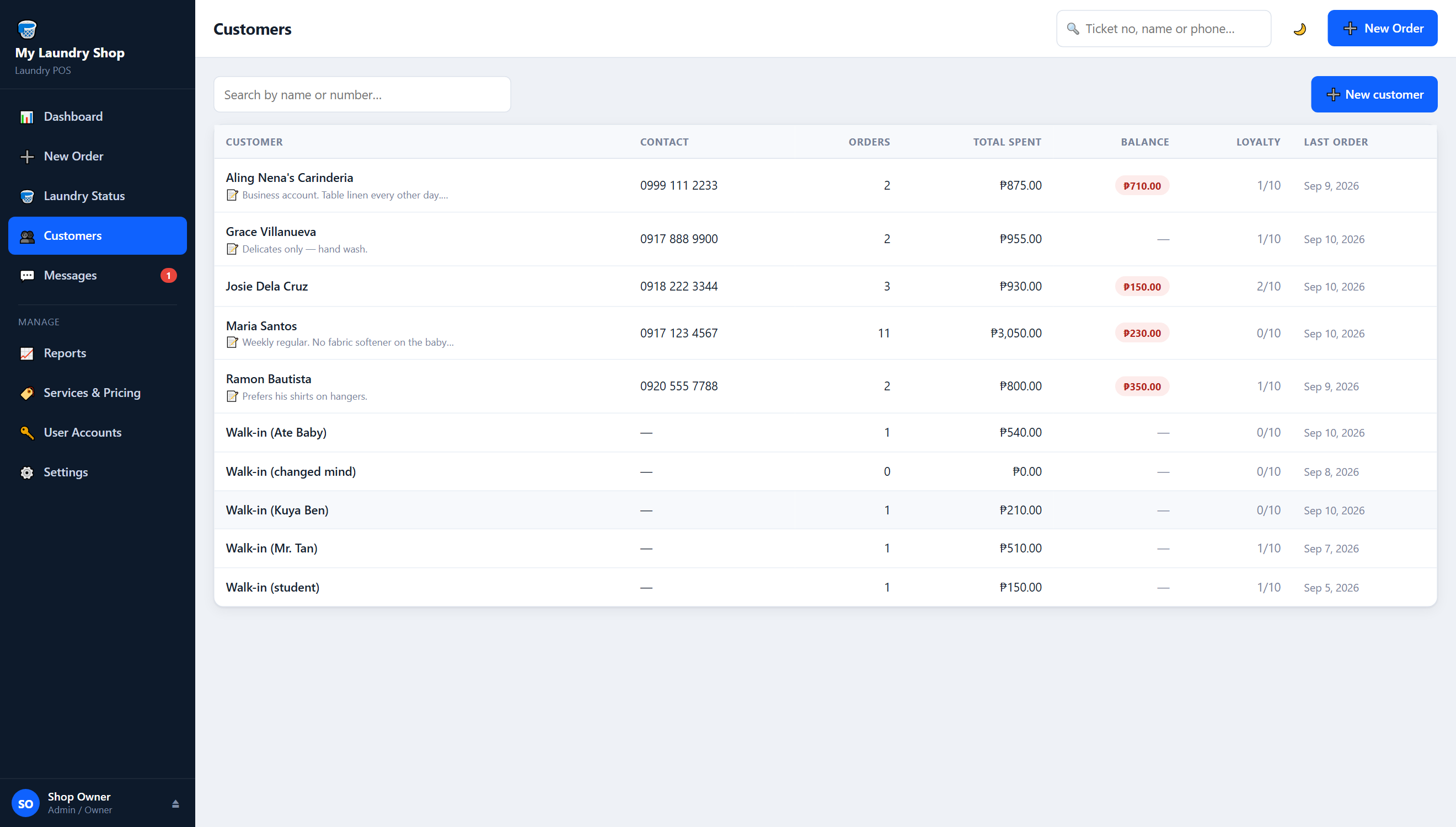
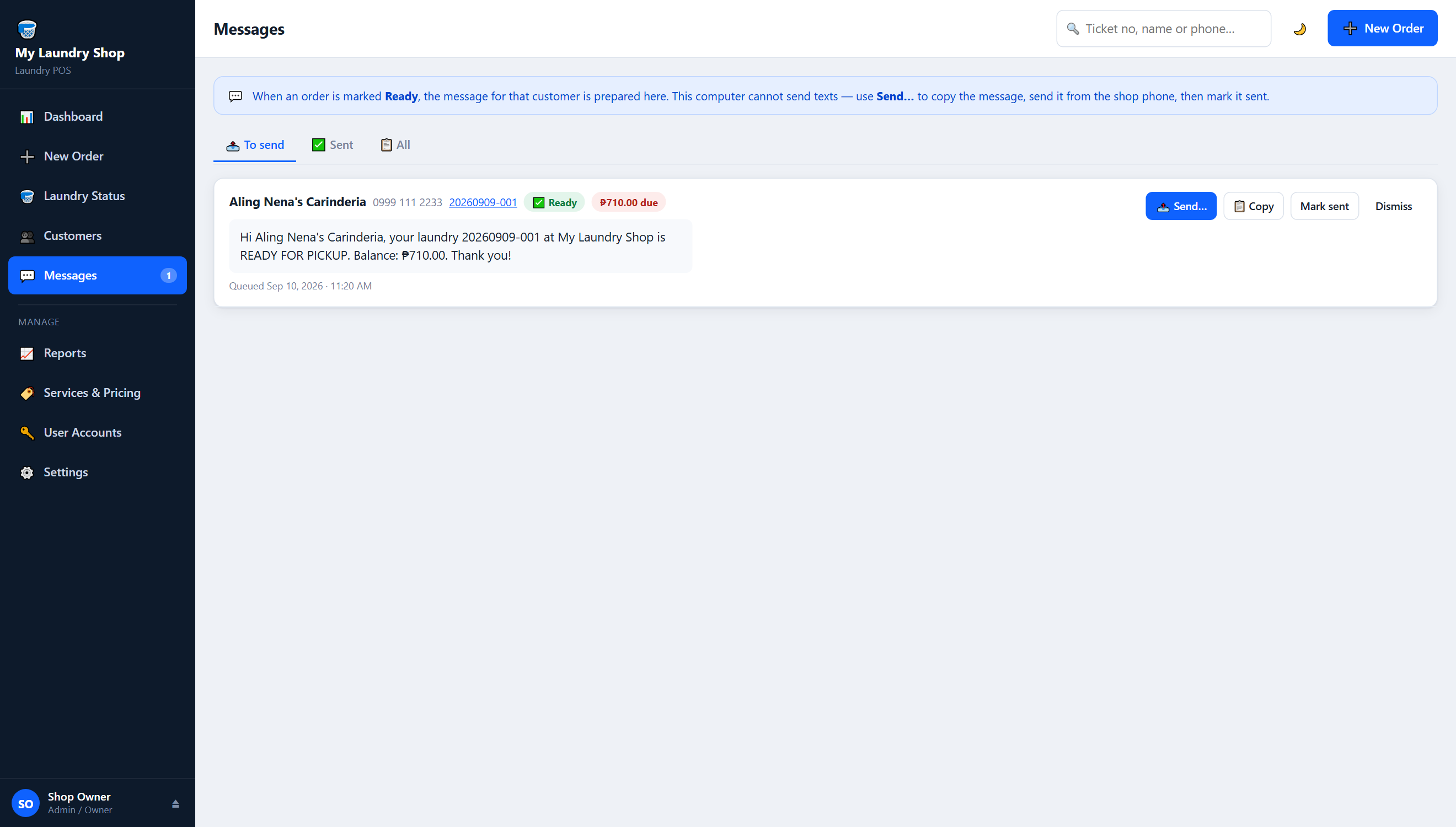
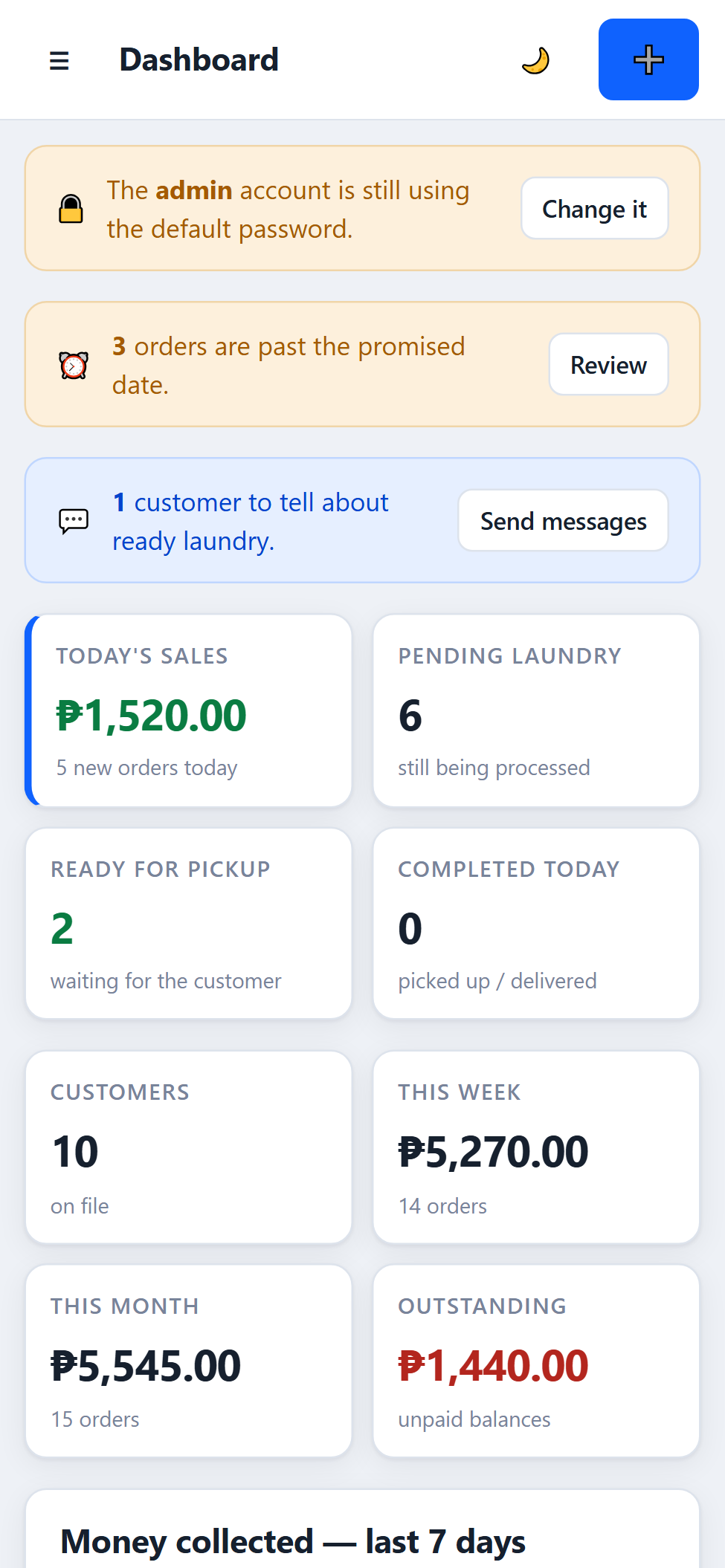
This is exactly what you'll download.
Every picture here is a screenshot of the real app.
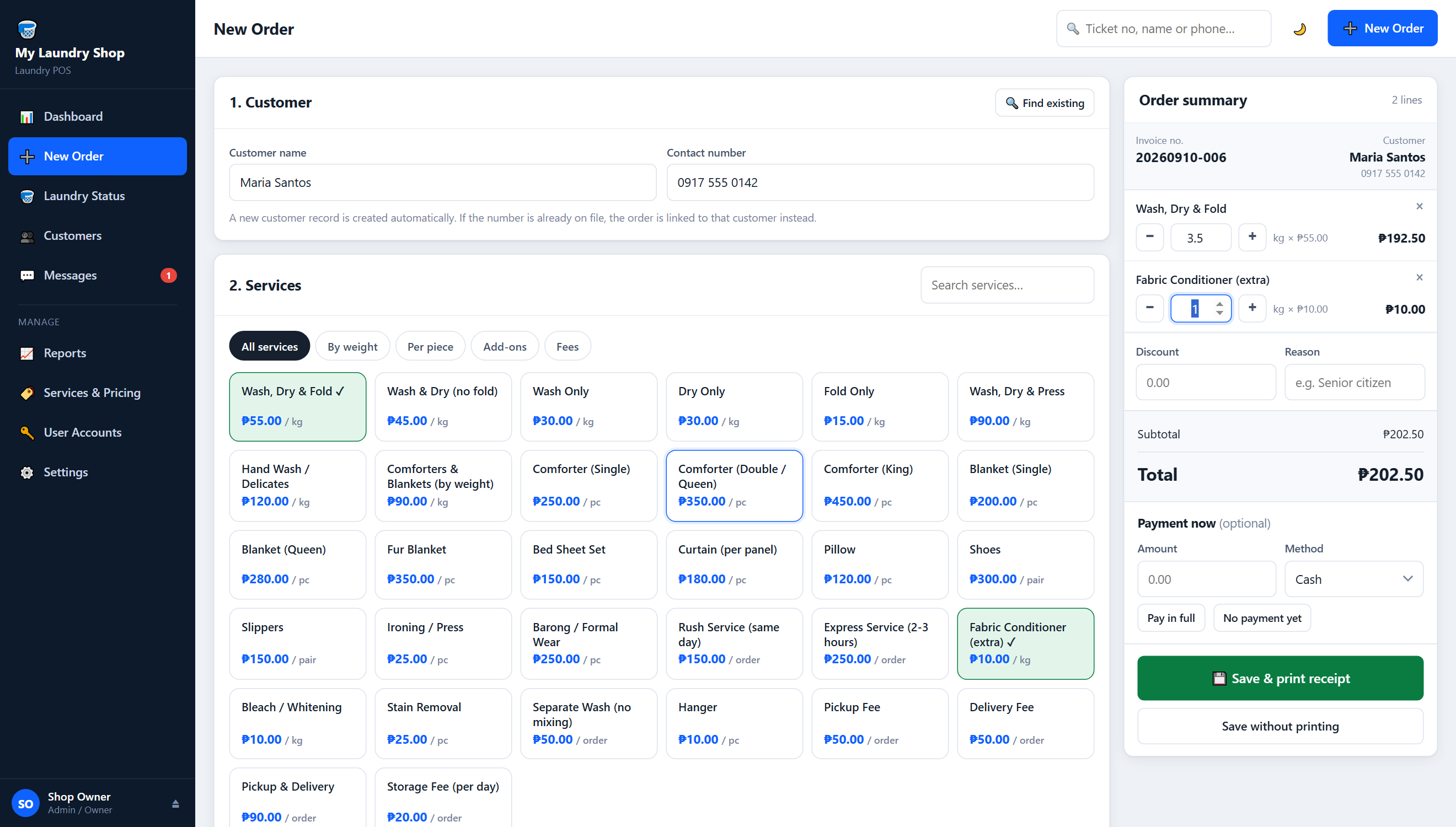
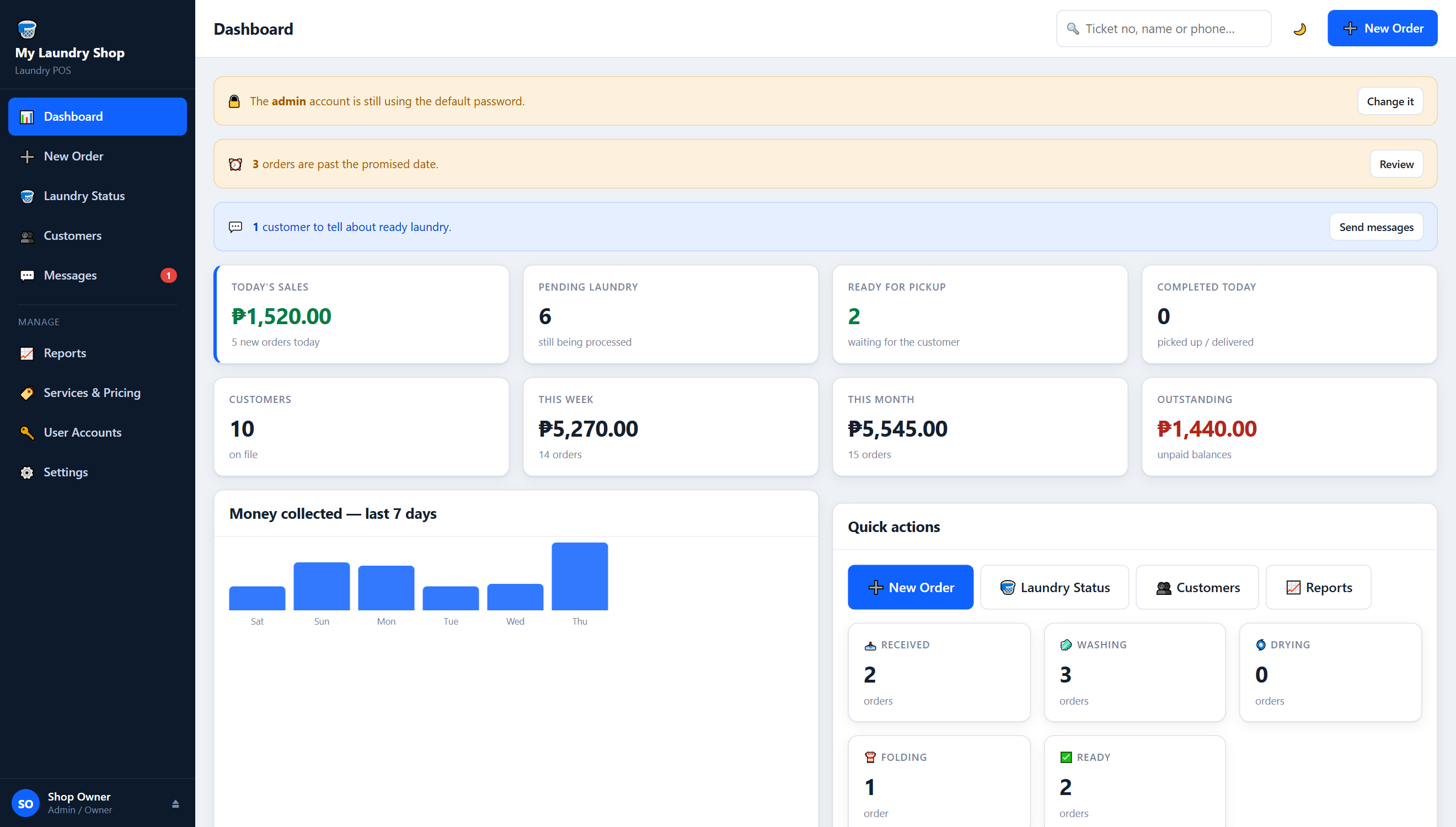
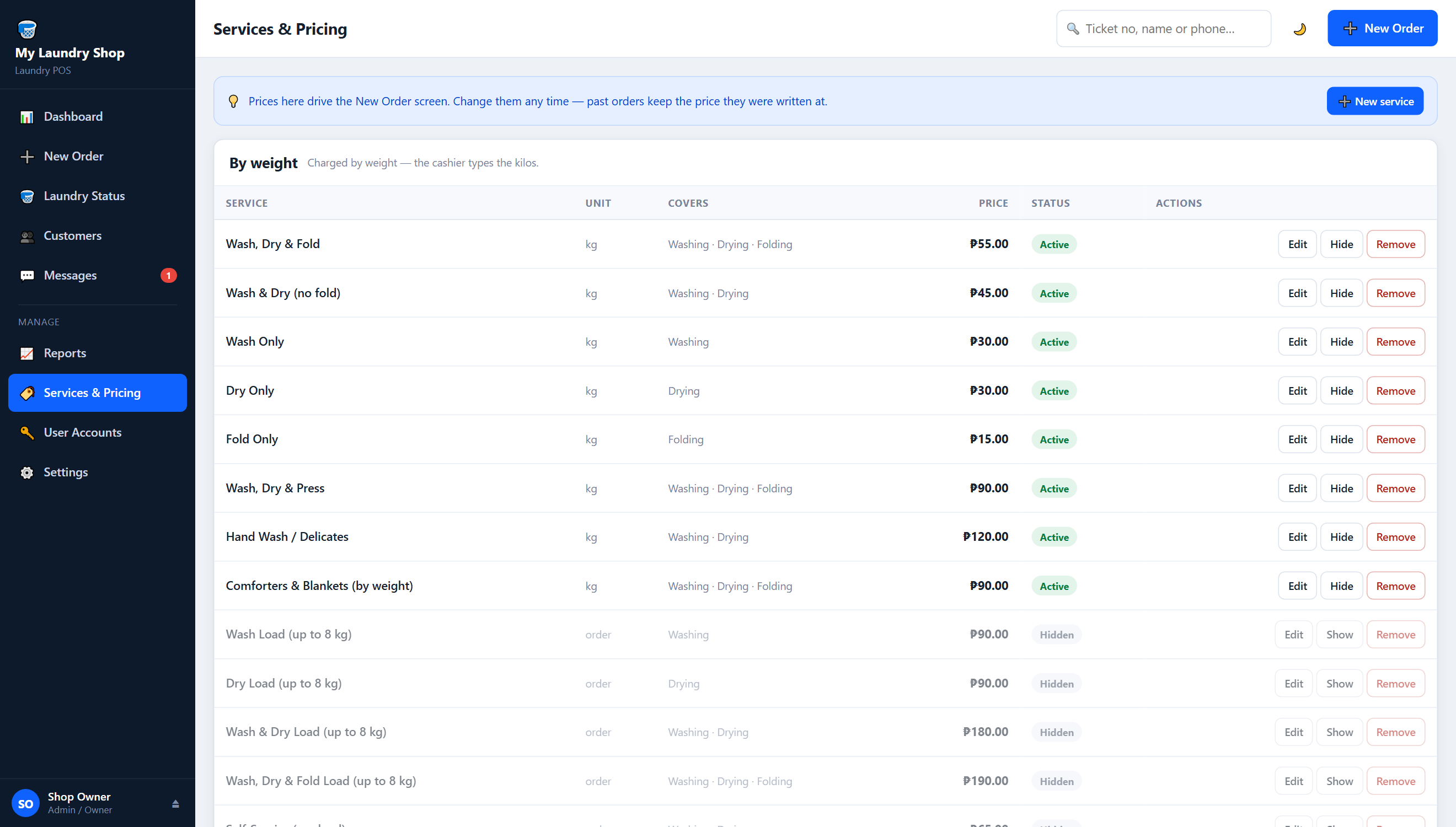
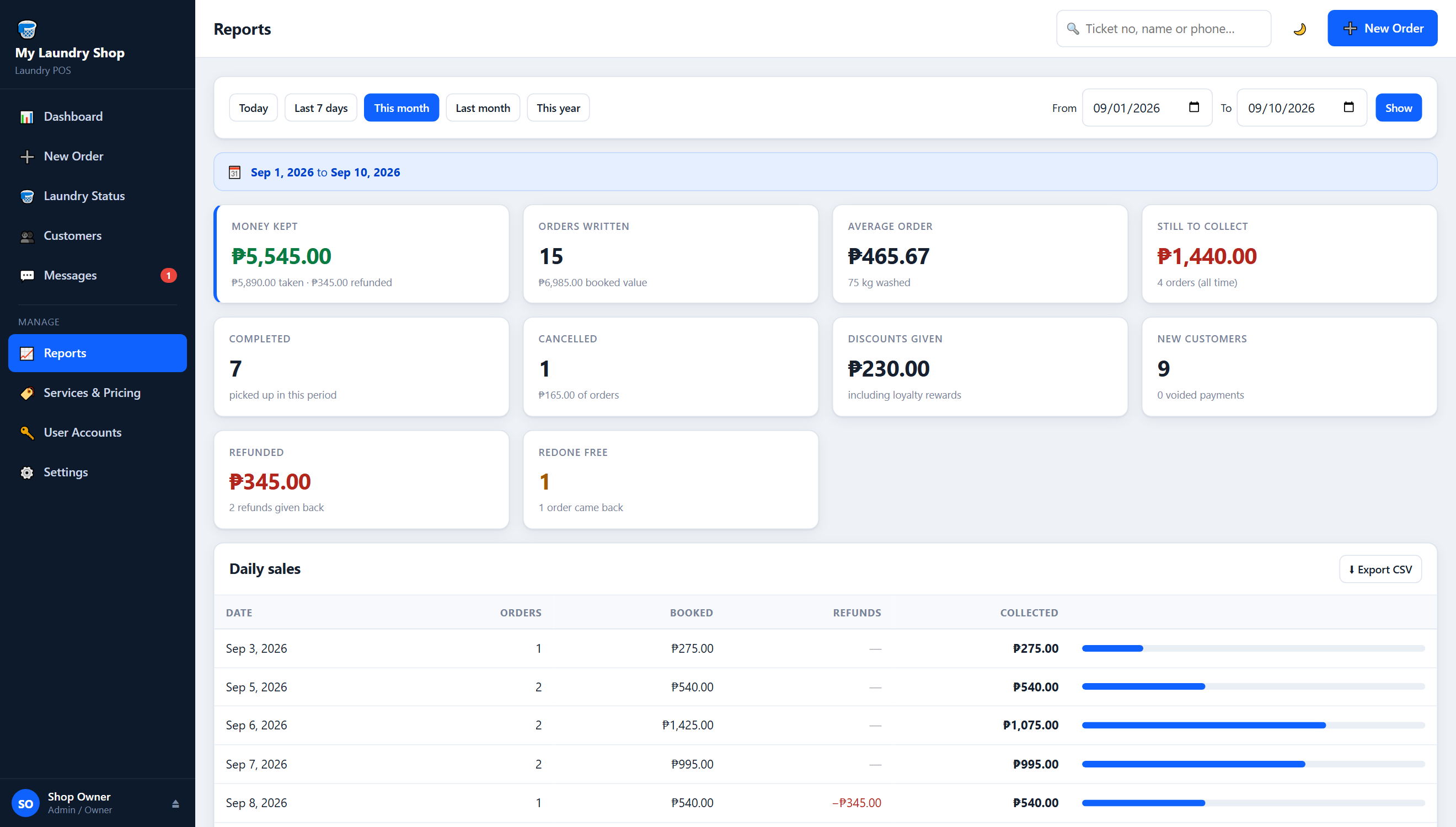
Check the board from the folding table.
Any phone or tablet on your shop WiFi can open it in the browser. Nothing to install on them. A Windows computer still runs the system.
Everything the counter needs. Nothing it doesn't.
Take an order in under a minute
Charge by kilo or by piece. Add a bag number and bag colour so nothing gets mixed up. Set the pickup date, pickup or delivery, notes, and a discount with a reason.
No laundry leaves unpaid by mistake
Take part payment or full payment — cash, GCash, Maya, bank transfer, card or other. If a bag with a balance is about to go out, the system stops and offers to collect while the customer is still there. If you release it anyway, that is recorded.
Print receipts on a Bluetooth printer
Works with 58mm or 80mm thermal printers. Shop details, items, total, paid, balance and a QR code. No driver needed. The Find my printer button sets it up for you.
"Ready for pickup" from your own phone
When an order is ready, the system writes the message and opens your phone's messaging app. You press send on your own SIM. No SMS subscription.
Know what you really earned
Pick any date range. See money collected vs booked, top services, kilos handled, who owes you, discounts, refunds, cancellations, redos and your best customers.
Staff only see what they need
Owner sees everything. Cashier takes orders and payments but can't change prices or see your takings. Staff move laundry along and send pickup texts.
A price list ready on day one
Wash/dry/fold, wash only, dry only, press, hand wash, comforters, add-ons and fees. Every price is editable. Set a minimum charge per order.
Your customer list builds itself
Names, numbers, order history and balances fill in as you take orders. Turn on loyalty points if you want them.
Your whole shop in one file
Everything lives in one file on your computer. One click makes a full backup. Copy it to a USB stick.
Brownout. Signal down. The counter keeps going.
It runs on your own Windows computer, not on the internet. No internet is needed at all - not even to install it.
- 01Your customer details never leave your shop.
- 02An old 64-bit laptop is fine. It uses less memory than one browser tab.
- 03A year of orders takes up only a couple of megabytes.
Buy it once. Keep it.
Most cloud POS systems charge every month, for as long as you use them.
Monthly cloud POS
₱300–₱500
every month — ₱3,600 to ₱6,000 a year
- Pay every month, forever
- Usually needs the internet to run
- Your data sits on their server
Laundry Shop POS
₱1,999.00
one payment — that's it
- No monthly fee, nothing to renew
- Works offline
- Your data stays on your computer
Run your shop on it for a week. Then decide.
You don't have to trust a stranger with your money first. Use the real thing in your real shop.
- 1
Download free
From our Google Drive folder. No account, no card.
- 2
Install
Unzip and double-click. Nothing else to install, and no internet needed.
- 3
Use it 14 days
Everything works. Real orders, real receipts — and they're all kept.
- 4
Buy your key
Your key arrives by email. Paste it in once and type your shop name. That's it.
If the 14 days run out, nothing gets stuck.
Orders already in your shop still move along the board, take payment and print. Only new orders wait for the key. Your customers' clothes are never held up over a licence.
What it does not do.
Better you know now than after you pay.
- Mac or Linux64-bit Windows 10 or newer only. A phone or tablet can use it over shop WiFi, but a Windows computer must run it.
- Automatic SMSIt writes the message and opens your phone's messaging app. A person presses send.
- BIR Official ReceiptIt prints a customer receipt. It is not BIR-accredited. Issue official receipts the usual way.
- Checking from homeIt works on shop WiFi only. That's on purpose — your customers' details stay in the shop.
- Accounting, payroll, inventoryIt handles laundry orders and the money attached to them. Nothing else.
- More than one branchOne shop per licence. No multi-branch.
Requirements
- A 64-bit Windows 10 or newer computer. An old laptop is fine.
- Nothing else. No internet needed, and nothing to install first - it is all inside the download.
- Optional: a 58mm or 80mm Bluetooth thermal printer.
- Optional: any phone or tablet on the same WiFi.
What's included
- The software, with a full starting price list.
- Setup Guide with screenshots of every screen.
- How It Works guide for daily use.
- Two setup videos — installing it, and running a day on it.
- A licence key by email, minutes after you pay.
"No testimonials yet — I'm new. So judge it by what you can see. Or run it in your own shop for a week and judge it that way."
- Screen recordings of the real app
- A real receipt printing on a 58mm printer
- Two setup videos and a 4½-minute overview
- Two illustrated guides
One payment. Yours to keep.
Try it free first. Buy the key when you're ready.
Laundry Shop POSLicence for one shop
₱1,999.00
₱2,999.00
Paid once. No monthly fee. No account. Nothing to renew.
- Full software for one shop
- Setup Guide + How It Works guide
- Two setup videos
- Licence key, emailed the moment you pay
- Checked offline — never asked for again
Walang computer? May tablet version na.
Kung tablet lang ang meron ka sa counter, may Android version na ng Laundry Shop POS. Pareho ang ginagawa: orders, resibo, utang, reports. Nasa tablet mismo ang lahat — walang internet, walang monthly.
Hindi ito remote screen. Hiwalay siyang app na tumatakbo mismo sa tablet, may sarili siyang kopya ng data mo. Kung meron ka nang Windows version, magkahiwalay sila.
- Android 7 o mas bago. Kahit lumang tablet.
- Same price: ₱1,999, bayad isang beses.
- Same 14-day free trial.
- Gumagana rin ang Bluetooth receipt printer.
Hindi siya galing sa Play Store, kaya may isang warning screen na kailangan mong lagpasan. Kasama sa download ang step-by-step na gabay.
Common questions
Do I need internet?
No - not even to install it. Everything the POS runs on is inside the download. Brownouts and dropped signal won't stop your counter.
Will it work on my Mac?
No. It needs a 64-bit Windows 10 or newer computer. An old Windows laptop is fine.
Can I use it on my phone?
Yes, as a second screen. Any phone or tablet on your shop WiFi can open it in the browser. But a Windows computer must be the one running it. If you have no computer at all, there is a separate Android tablet version that runs on the tablet itself.
What happens after the 14 days if I haven't bought yet?
Nothing gets stuck. Orders already in the shop still move, take payment and print. Only new orders wait until you add your key. All your data stays.
Is the receipt a BIR Official Receipt?
No. It prints a customer receipt. It is not BIR-accredited. Keep issuing official receipts the usual way.
Does it send SMS by itself?
No. It writes the "ready for pickup" message and opens your phone's messaging app. You press send on your own SIM. That's why there's no SMS fee.
Do I need a receipt printer?
No, it's optional. If you want one, use a 58mm or 80mm Bluetooth thermal printer. No driver needed.
Is it hard to install?
No. Unzip the folder and double-click one file. There is nothing else to install and no internet needed - the engine and every part it uses are already inside the download. The illustrated guide and setup video walk you through every step.
Can I use it for two branches?
No. It's made for one shop. It has no multi-branch feature.
How do I keep my data safe?
All your data is in one file on your computer. Click backup to download a full copy. Save it to a USB stick.
Do I ever pay again?
No. One payment. No monthly fee, no account, nothing to renew.
By day seven, your prices, customers and takings are already in it.
The question stops being "does this work?" It becomes "do I want to go back to the notebook?"
Free 14-day copyWant the setup guide by email?
We'll send the setup video and tips, and a reminder before your 14 days end. Your download starts right after.
Skip — just downloadYour download opened in a new tab.
Check your email for the setup guide. If the tab didn't open, click here to download.
Try it free for 14 daysNo card. No account.